Demo benchmark
If you do not have a database to tune yet but want to try DBtune, use the demo. It spins up a PostgreSQL instance locally, runs a real benchmark workload against it, and connects everything to the DBtune platform so you can watch the tuning loop end-to-end.
Prerequisites
The demo runs anywhere you can run Docker: a laptop, a Raspberry Pi, a server machine, or a VM in the cloud.
Supported operating systems: macOS, Linux, and Windows (WSL). The only requirement is a working Docker installation.
What the demo does
The demo takes around 10 minutes to set up. It runs a single script on your machine that:
- Starts a PostgreSQL container with
pg_stat_statementsenabled. - Loads and runs a BenchBase OLTP workload (Epinions) inside Docker.
- Launches the dbtune-agent and connects it to both the database and the DBtune platform.
Once the script finishes you are redirected to the DBtune dashboard for the demo database, where you can start tuning and watch the results come in just like you would for a real database.
Where to find it
From the Database instances page, click the Demo button in the top-right corner, next to Add.

This opens the demo dialog. Pick your platform (macOS / Linux or Windows (WSL)), optionally expand View script to inspect what will run, and click Download to get demo.sh.
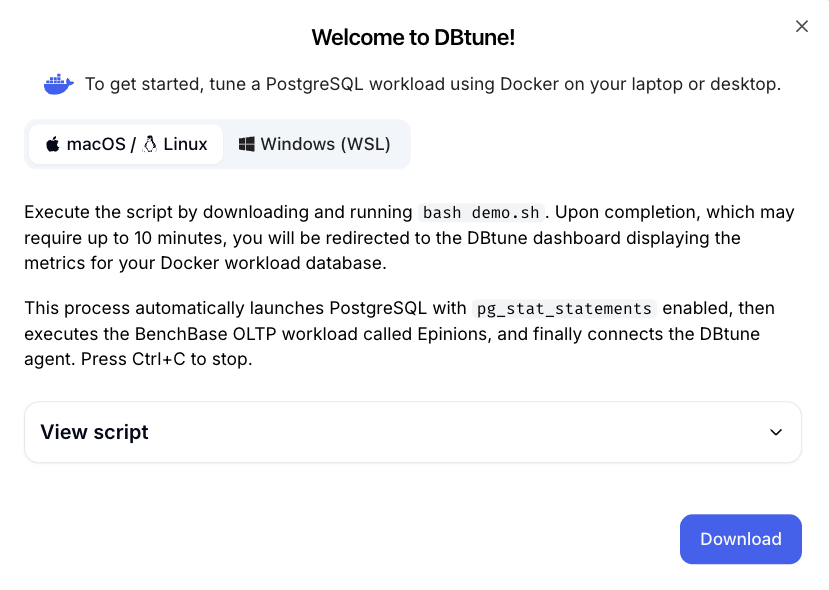
Copy and paste the command below into a terminal in the directory where you saved demo.sh:
bash demo.sh
The script streams the agent logs once everything is up. Stop it from the terminal when you are done (Ctrl+C on macOS, Linux, and Windows); the containers are cleaned up automatically.
Next steps
- Open the demo database in the
Dashboardtab and watch DBtune work through its tuning iterations. - When you are ready to tune a real database, follow the How to get started guide.
- For background on how the agent connects to PostgreSQL, see the agent overview.