Parameter selection
Overview
By default, DBtune tunes a set of PostgreSQL configuration parameters. Parameter selection lets you narrow that set, choosing exactly which parameters DBtune may change during a session while the rest stay at their current values.
This is useful when you want to keep specific parameters under your own control or focus a session on a subset of parameters.
How it works
- Navigate to your database's Tuning tab.
- Open the Advanced settings section.
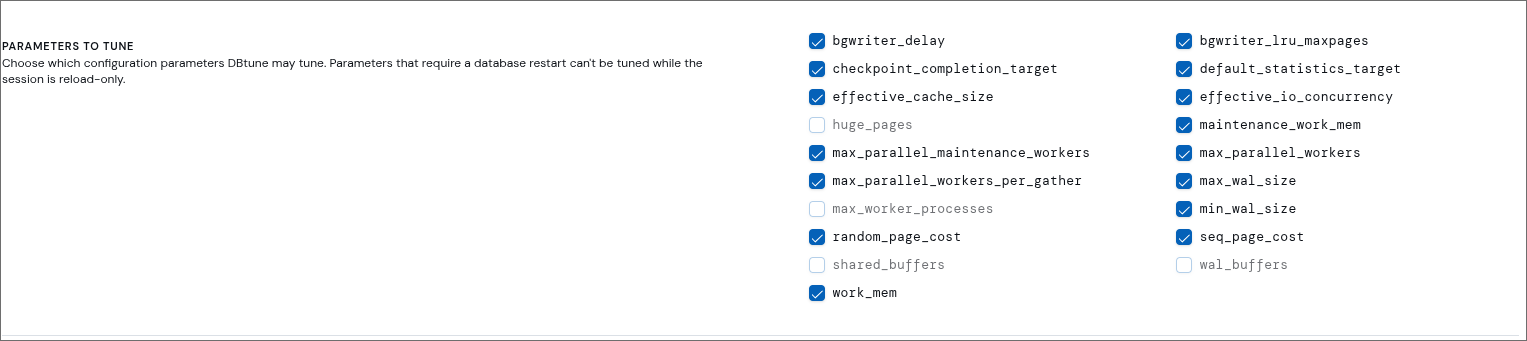
- Under Parameters to tune, tick the parameters DBtune may tune and untick the ones to leave fixed.
All parameters are selected by default, and only the selected ones are sent to the agent when you start a session. You must keep at least one selected, otherwise tuning cannot start.
The available parameters depend on your database platform and hosting environment. See Supported PostgreSQL flavors for the per-platform list of parameters.
Restart-required parameters
Some parameters only take effect after a database restart (for example, shared_buffers). In a reload-only session these are greyed out and can't be selected. Enable Restarts allowed in Advanced settings to make them selectable. On platforms that only ever reload, such as Azure Flexible Server, Amazon Aurora, and CloudNativePG, they stay unavailable.
See Tuning modes for how reload-only and restart modes work.